|
What's new: 1.6.1
|
 |
 |
Released 2026-10-19
|
|
|
|
1.6.1
- Transfers
- A folder download can be paused and resumed: Start skips the files it already has, picks up the one it stopped in, and fetches the rest
- A file's upload, up to 4 GiB, can be paused and resumed: Start sends the rest of the file from what the server already has, or, when the server can't resume it, the whole file again; an upload whose file changed while it was paused, or that the server refuses, stays paused, saying why
- A folder's upload can be paused and resumed: Start asks the server to take up the folder it holds, and sends each file from what the server already has of it, skipping any it has whole; an upload with a file that changed while it was paused stays paused, saying so
- Fixed folder uploads to Janus stalling after the first file, and folder uploads to Janus and hlservd ending early, leaving as many items unsent as the folder has subfolders
- Connections
- Reconnect, on the banner after a lost connection, reconnects that tab to the server it lost, however it connected (the Connect dialog, a bookmark, a link, the tracker,
/server or --server), rather than to whichever server some other tab connected to last
- Post News posts to the server it was opened for, even when another connection opens and takes the focus while you write; it closes with its tab, and if that connection drops first it keeps what you wrote rather than closing
- Closing a connection's tab closes its user editors and File Info windows; one left open across a reconnect to another server no longer saves there, and neither does the answer to a chat invitation
- A chat line arriving on a connection you aren't looking at is checked for a mention against your name on that server, and its speaker and avatar come from that server's user list, rather than the one in focus
- Changing the theme or font in Settings applies to every open connection, not only the one in focus, and so do the nickname and the icon, each except where a connection has its own: from its entry in Settings → Connections, or set there with
/nick or /icon, kept until it connects again without one
- A new avatar chosen in Settings goes to every connected server that takes one, not only to the one in focus
- Two servers logging in at the same moment each show their banner, where the first could be left with none
- Accessibility
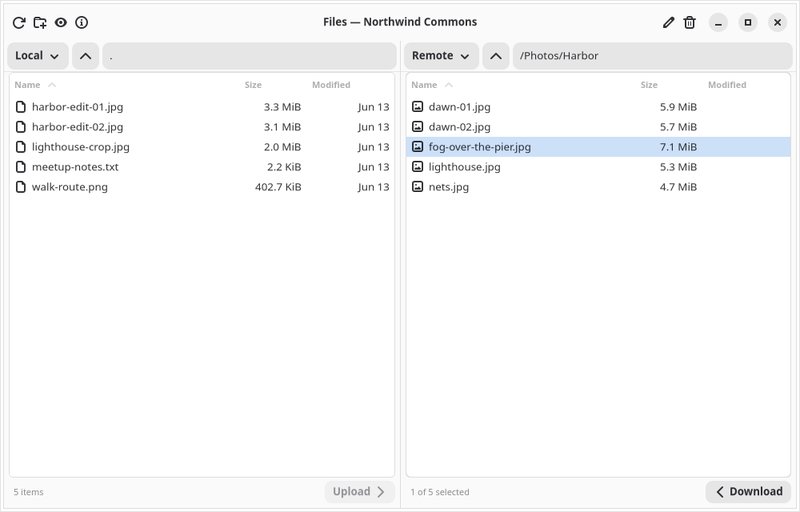
- A transfer reads as its file, its place in the queue and its progress, and, with more than one connection open, which server it is on; the Files window's two lists say which is local and which is remote, and a tracker's server list is named for its tracker
- A video tile's picture is named for what it shows, a camera or a shared screen, so a screen reader can tell apart the two tiles of a user sharing both; a tile says its user's name once rather than twice
- Users
- The voice column's heading is an icon that follows the theme, rather than an emoji
- Files
- Fixed downloading a file whose name is one character long from hlservd
Downloads
|
|
|
|
( Release page )
|
|
|
|
1.6.0
|
|
|
Released 2026-10-14
|
|
|
|
1.6.0
- Accessibility
- Screen readers can name every button, the users list (with who is away or an admin), text inputs, chat views, news, transfers, previews and the dock's panes, and are told of private messages, mentions, a lost connection and changes to the layout; a tracker's section reads as its title rather than every server in it
- More works from the keyboard: the chat view (Tab through its links, nicks, pictures and "load more" rows, Enter to open one, Menu or Shift+F10 for its menu, Ctrl+A to select all), the users list's menu (Menu or Shift+F10), links in news, the server banner, Escape to close dialogs, F10 for the main menu, F6 to move between panes from anywhere, and Ctrl+1 to Ctrl+6 for the panels
- A Keyboard Shortcuts window (Ctrl+?) lists every key
- Clicking a notification opens the conversation it was about; a second launch with --server or --bookmark connects in the running GtkHx instead of opening another
- Themes step aside for the system's high-contrast setting, and links are underlined rather than told apart by color alone
- Away and admin names in the users list are easier to read when the theme doesn't color them
- Transfers
- The Tasks panel is now Transfers, holds only downloads and uploads, and has a new icon; it stays where your saved layout put it
- A download can be paused and resumed: Pause ends its connection and keeps what has arrived, and Start picks up from there; a paused download gives up its place in the server's queue
- A download waiting its turn shows its size, and no longer says "Queued #4294967295" while it waits in GtkHx's own queue or "0 of 1" while it waits in the server's
- Clicking a transfer selects just that one, rather than adding it to what was already selected, which left Pause and Start acting on the first
- A connection shows its progress with a spinner beside the header bar's title and on its tab, rather than as a row in the list
- The tracker window shows a spinner while it fetches its server list, rather than a row in the list
- News
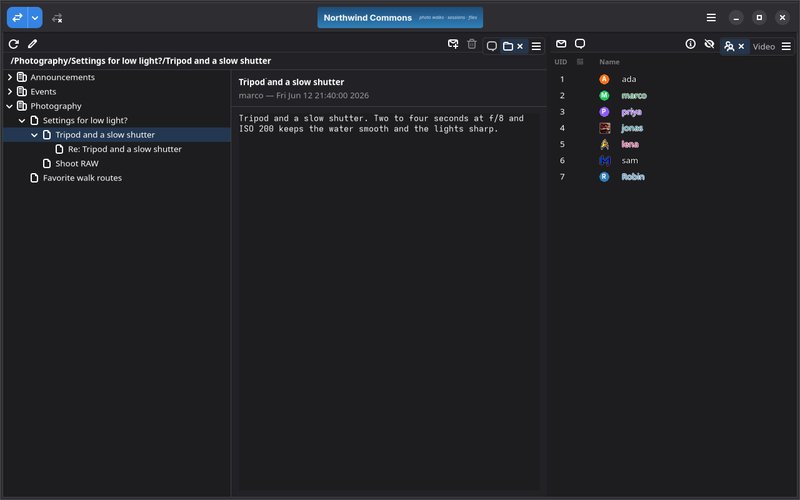
- Threaded news (News 1.5+) opens in a window of its own for each connection, as Files does, rather than as a panel; Ctrl+4 still opens it
- The news browser shows the pictures an article carries below its text, as hxd-ng serves them to classic clients
- Fixed an article whose only part is a picture showing as garbled text
- File Previews
- Previewing an audio or video file plays it while it downloads, with seeking; only what is played is fetched
- Previews no longer download the whole file: a long text shows its first 256 KiB, and an image or PDF too large to preview says so, each with a Download button for the whole file
- Audio and video are never shown as text: a build without GStreamer says it can't preview them, and a file past 4 GB says it's too large to preview
- Fixed previewing an empty file leaving its window on "Loading…"
- Fixed a crash closing a preview window after its download had failed partway
- Messages
- A private message can carry a picture, as a chat line can, on servers with inline media (Janus, hxd-ng): the paperclip beside the message's input sends one
- Voice
- Push-to-talk no longer leaves the microphone on when its window loses the focus with the key held
- Push-to-talk works in the Files and News windows and in panels moved out into windows of their own
- Users
- Fixed avatars from 48 to 199 pixels wide showing nothing in the users list; on hxd-ng servers that was every avatar set from hx-ng
- Files
- Fixed downloads failing on hxd-ng servers
- Fixed downloads from hlservd (the Hotline Server 1.9.5) failing, single files, previews and folders alike; broken since 1.3.0
- Fixed uploads to some servers, hxd-ng among them, reporting failure though the file arrived
- Fixed downloading a folder that holds files of 4 GB or more failing partway; 1.5.0 listed this as fixed but shipped without it
- Fixed a folder download in the queue being cancelled when another transfer ended
- Fixed downloads from mhxd being fetched twice over, which showed speeds above the server's limit and progress ahead of the file
- Connecting
- Nothing is sent to a server until the login is done: opening the file browser, sending a chat line or changing your name while an agreement is showing now waits until you're logged in, rather than going early, which the 1.9 server disconnected you for
- Code Modernization
- Building now needs GTK 4.16 and GLib 2.76
- Translations
- Translated the new strings
Downloads
|
|
|
|
( Release page )
|
|
|
|
1.5.0
|
|
|
Released 2026-10-08
|
|
|
|
1.5.0
- Docking
- A new dock, built on mullion-gtk in place of libpanel; your layout carries over
- A pane's tabs sit in its top corner as icons, shown when the pane has room or while you are in it; Pane Titles brings back tab strips with titles
- Drag a tab onto another pane's tabs, onto a pane, or onto an edge to split it; drag it out of the window to give it a window of its own, and back to dock it
- Alt with the arrows moves between panes, Alt+Shift moves the pane, and Alt+Enter zooms one to fill the window
- Reset Layout takes effect at once, rather than at the next launch
- A pane closes when its last panel is moved out or closed, and a panel's toolbar button and menu item always bring it back
- Video and Voice
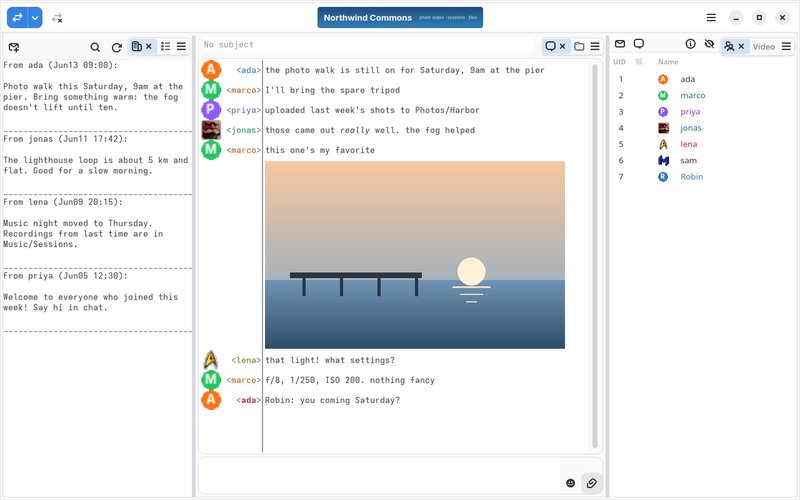
- Video tiles fill the panel, each at its stream's shape; click one to bring it into focus, and again to show everyone alike
- Each tile can focus, mute, or stop watching someone, and the bar below brings them back
- On a metered connection you receive one video at a time and click another to switch; Settings → Voice can turn this off
- No video is downloaded while the window is minimized
- Changing the microphone, speaker or camera in Settings switches a call in progress
- Cameras show up as soon as they are plugged in or out, and a chosen camera that is unplugged stays chosen, marked as missing
- The users list shows who has a camera or screen share on, even when GtkHx can't play video, and chat says when someone in your voice room starts one
- Fixed video sometimes staying blank, or failing to start, after someone turns their camera on
- Fixed join and leave sounds after switching voice rooms
- Screen readers can name the camera and screen-share buttons and the users list's video icon
- Chat
- Very long scrollbacks stay fast, and nickname completion is faster on busy servers
- A link whose text isn't its address shows the real address before opening it, every link shows its address on hover, and email addresses are links again
- Settings → Chat can turn off opening links with a single click
- Dismissing a selection with a click no longer also opens the link under it
- Chat settings reach every connection, not just the one in focus
- Chat history shows line breaks and accented characters correctly
- Load Older no longer gets stuck on "Loading…" when the server turns it down
- A private chat you start opens its window right away, and one you closed no longer reopens when the server answers late
- A picture sent in a private message shows in the message window, and with two servers open, a picture appears in the chat it was sent to
- Users
- Names show in their own color without the old outline, with a soft shadow only where a wide banner icon would make them hard to read
- A name colored too close to the list's background, such as dark red on a dark theme, is lightened or darkened until it reads, keeping its hue, on the selected row too
- Clearing your nick color clears it for everyone else too
- With two servers open, each user list shows its own server's GIF icons, and new ones as they arrive
- Files
- Large folders open several times faster, and sorting by name is faster too
- Get Info can save just a comment on Janus servers
- Fixed renaming in place adding to the name instead of replacing it, and moving and renaming in one step leaving the file under its old name
- Fixed downloading a folder that holds files of 4 GB or more failing partway
- Fixed very long folder names breaking the path sent to the server
- Fixed the right-click menu's last items being cut off, and local folders showing "(4096 items)" as their size
- Security fix: a server can no longer make a folder download write outside the folder you download it to
- News
- A folder, category or article the server refuses no longer stays stuck loading; you can try again
- Account Editor
- Save closes the editor once the server has saved the account; if it refuses, the editor stays open and says why, instead of only playing the error sound
- New User works on Janus servers, won't replace an account that already exists, and turns off the privileges you don't have yourself, which most servers won't let you give
- Saving an account without touching its password no longer changes the password on Mobius servers
- The account editor and the Broadcast window act on the server you opened them for, even after you switch to another connection, and send nothing once you've disconnected from it
- Accented and Non-Roman Text
- File names in non-Roman scripts, such as Japanese, no longer go missing from file listings, and files and folders with accented names open, download, rename and delete on servers that don't use UTF-8
- Accented text shows correctly in Get Info, server broadcasts, threaded news and the account editor
- Accented names are sent correctly when posting news, making news categories and saving accounts on servers that don't use UTF-8, and saving keeps an accented account name you didn't change
- Names with accented characters no longer show "is now known as" at every status change
- Connecting
- A rejected login shows the server's own message, a secure (HOPE) login the server doesn't support included
- HOPE secure logins compress the connection with the Compression setting's choice (GZIP, LZ4 or ZSTD) when the server supports it
- Fixed HOPE-encrypted connections misreading a message split across frames
- GtkHx now tells servers it is GtkHx (client version 254) instead of the Hotline 1.8.5 client
- Closing a server's agreement window declines it, like the Disagree button, and an empty agreement no longer opens an empty window
- No more errors from servers that refuse your saved GIF icon at login, or that refuse GtkHx's once-a-minute check that the connection is alive
- Sending text is faster on servers without Unicode
- Security fix: TLS connections now use rustls 0.23.45, for RUSTSEC-2026-0285, in which a server could send handshake messages unencrypted that should have been encrypted (it could not tamper with the handshake)
- Tasks
- Logging in, listing folders, loading news, sending messages, joining voice, starting video and the other quick requests no longer flash by in the Tasks list; transfers still show there
- Trackers
- New installs list tracker.vespernet.net and tracker.preterhuman.net beside hltracker.com
- Updates
- The Flatpak tells you a new version is out as soon as it starts, and can update and restart into it; Settings → General can turn this off
- Windows, macOS and Flatpak test builds show their real version, such as 1.4.1b2, in About instead of 1.4.1-dev
- Translations
- The Local / Remote selector in the file browser is now translated
- The Flatpak download now includes the translations
- Code Modernization
- The file browser is now Rust
- The chat view is now Rotulus, a standalone GTK 4 widget published on crates.io
- HOPE secure login and tracker listings now use hx-libs, the Hotline library GtkHx shares with hxd-ng and hx-ng
- Moved to gtk-rs 0.22; building now needs Rust 1.92
- Development
- Performance benchmarks, from single functions up to the running app
- End-to-end tests of GtkHx's own file requests against real servers
- The test servers now include hlservd, the Hotline 1.9 server
- A reference guide to the Hotline protocol and its extensions
Downloads
|
|
|
|
( Release page )
|
|
|
|
1.4.0
|
|
|
Released 2026-09-26
|
|
|
|
- Video
- Video chat and screen sharing, on servers that support it
- A dockable Video panel shows everyone's camera and screen, plus your own preview
- Choose a camera in Settings → Voice
- Camera tiles keep the same order, by user, instead of shuffling between calls
- Voice
- Fixed occasional audio problems after joining or rejoining voice
- Themes and Icons
- Themes now color the whole window, not just the chat
- Richer chat colors, and each nickname keeps its own color
- New icons that match the desktop and follow the theme's colors
- The original pixel-art icons live on in the new Classic theme
- New Neon Doll theme
- Settings → General can keep the system's window colors around a themed chat
- Files
- The file browser is now its own window, one per connection
- Clearer layout, with labeled Download and Upload buttons
- Right-click a file for Open, Preview, Get Info, Rename, Delete and more
- User Interface
- Slimmer window chrome, so chat gets much more of the window
- The server banner and connection status now sit in the header bar
- The status bar is gone, and the toolbar is optional (off by default)
- Pane titles and action bars can be hidden
- Chat tabs stay hidden until there is a second conversation
- Settings opens with Ctrl+,
- Hotline Protocol
- Fixed file transfers with Windows clients and servers
- macOS
- GtkHx now asks for camera and microphone access
- Fixed a crash on macOS versions too old to run GtkHx
- Code Modernization
- GtkHx now shares its Hotline protocol code with the hxd-ng server
- Translations
- Translated the new strings
Downloads
|
|
|
|
( Release page )
|
|
|
| |
|
Links
|
|
|
Clients
|
|
|
Servers
|
|
|
Trackers
|
|
|
Bots
|
|
|
Misc
|
|
|